OpenText Application Quality Management - Defect template with Quality Center Integration Request Type
The OpenText PPM request type that OpenText Application Quality Management provides for integration with
QC/ALM project defects is the OpenText Application Quality Management - Defect Template with Quality Center Integration request type. This request type uses only the OpenText Application Quality Management - Defect Template with Quality Center Integration workflow. To prevent you from inadvertently using a workflow that is not enabled for this integration, you cannot choose a different workflow. This request type includes the QC/ALM Defect Information field group.
OpenText Application Quality Management - Defect Template with Quality Center Integration request fields
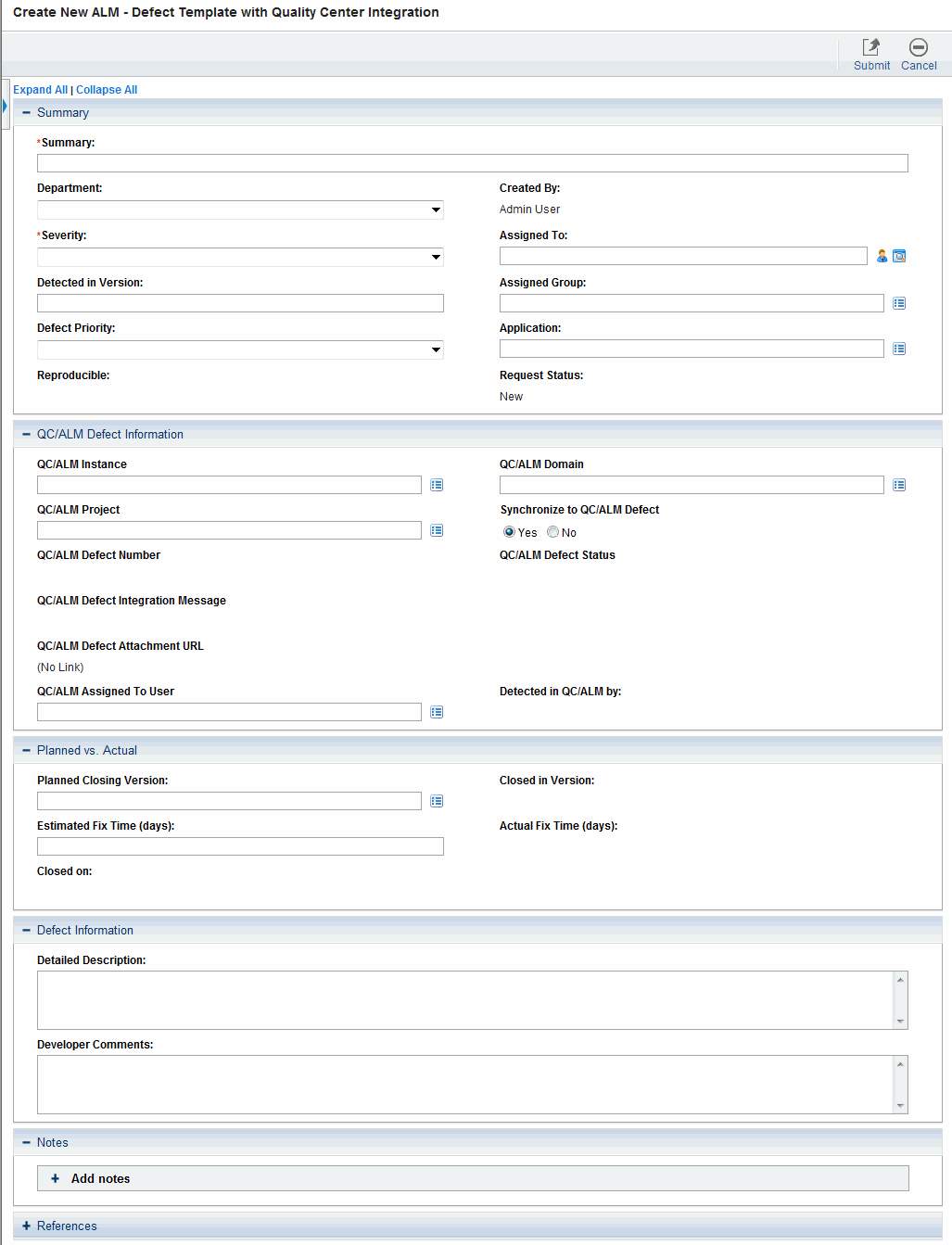
Figure 6-1 shows the Create New OpenText Application Quality Management - Defect Template with Quality Center Integration page that appears when you create a request and select the OpenText Application Quality Management - Defect Template with Quality Center Integration request type. Table 6-1 describes the fields in the request, including some fields that do not appear until the request is submitted for creation or until other conditions are met.
Figure 6-1. ALM - Defect Template with Quality Center Integration request
Table 6-1. ALM - Defect Template with Quality Center Integration request fields
|
Field Name (*Required)
|
Description
|
|
Summary section
|
|
Request No.
|
(Added after the request is created) Number of the request
|
|
Created On
|
(Added after the request is created) Date the request was created
|
|
*Summary
|
Summary description of the request
|
|
Department
|
Department to which the user belongs
|
|
Created By
|
User who created the request
|
|
*Severity
|
Severity of the defect
|
|
Assigned To
|
Developer assigned to work on the defect
|
|
Detected in Version
|
Version of the application in which the defect was detected
|
|
Assigned Group
|
Group responsible for addressing the defect
|
|
Defect Priority
|
Priority of the defect
|
|
Application
|
Application in which the defect was discovered
|
|
Reproducible
|
Option to indicate whether the defect is reproducible
|
|
Request Status
|
Status of the request
|
|
QC/ALM Defect Information section a
|
|
QC/ALM Instance
|
URL of the QC/ALM instance with the project used for the integration
|
|
QC/ALM Domain
|
Domain of the project in QC/ALM
|
|
QC/ALM Project
|
QC/ALM project that is integrated with this request type
|
|
Synchronize to QC/ALM Defect
|
Select Yes or No radio button to indicate whether synchronize to QC/ALM defect or not.
|
|
QC/ALM Defect Number
|
(Added after the defect is created in QC/ALM) Defect number in QC/ALM
|
|
QC/ALM Defect Status
|
(Added after the defect is created in QC/ALM) Status of the defect in QC/ALM
|
|
QC/ALM Integration Message
|
(Read-only. Added after the defect is created in QC/ALM.) QC/ALM status message indicating success or error in the most recent operation
|
|
QC/ALM Assigned To User
|
Assigned owner of the defect in QC/ALM
|
|
QC/ALM Attachment URL
|
URL of the list of attachments to the QC/ALM requirement or defect
|
|
Detected in QC/ALM by
|
User who detected the defect in QC/ALM
|
|
Planned vs. Actual section
|
|
Planned Closing Version
|
Version of the application targeted to have the defect fix
|
|
Closed in Version
|
Version of the application that has the defect fix
|
|
Estimated Fix Time (days)
|
Original estimate of the number of days it would take to fix the defect
|
|
Actual Fix Time (days)
|
Actual number of days it took to fix the defect
|
|
Closed on
|
Date the defect was closed in QC/ALM
|
|
Defect Information section
|
|
Detailed Description
|
Detailed description of the defect
|
|
Developer Comments
|
Developer comments regarding the defect
|
|
a. Fields in the QC/ALM Defect Information section remain visible by default but are not used if OpenText PPM is not integrated with QC or ALM.
|
Note: The administrator can remove the QC/ALM Defect Information section from the request type by removing the QC/ALM Defect Information field group from the
OpenText Application Quality Management - Defect Template with Quality Center Integration request header type.
For details about request header and field groups, see the Demand Management Configuration Guide.
 Back to top
Submit an OpenText Application Quality Management - Defect Template with Quality Center Integration request
For information about how to submit a request of a certain request type, see Create a new request from menu.
When the request is submitted, it is assigned an initial status, such as New. The request is then routed along the OpenText Application Quality Management - Defect Template with Quality Center Integration workflow (see OpenText Application Quality Management - Defect Template with Quality Center Integration Workflow).
Back to top